Status Effects






A FoundryVTT module that allows configuring and editing of the status effects.
Overview
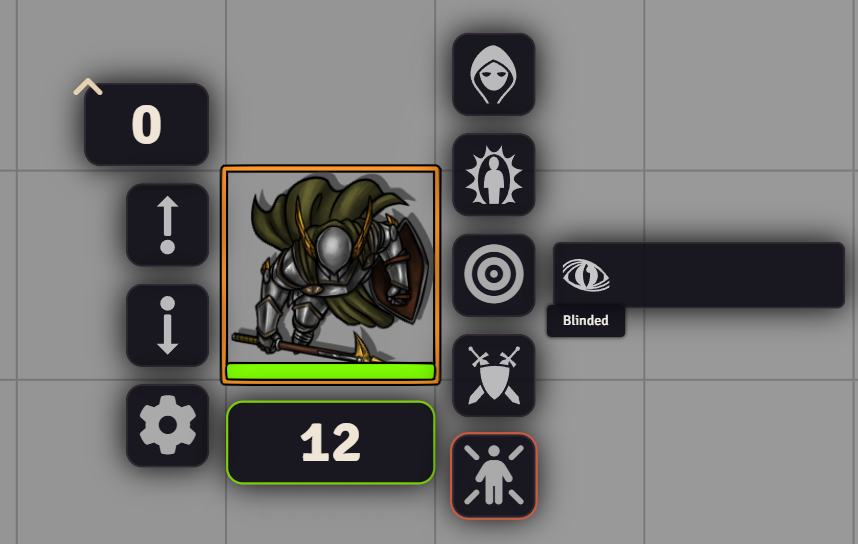
Status Effects gives you control over which status effects appear on the token HUD. A configuration sheet lets you create, edit, and drag-and-drop to reorder them, so you can add custom statuses for your own mechanics or cut the default set down to what your campaign actually uses.
Features
- Adds a status effects button to the token HUD
- Click an effect in the token HUD to toggle it, or right-click to toggle it as an overlay
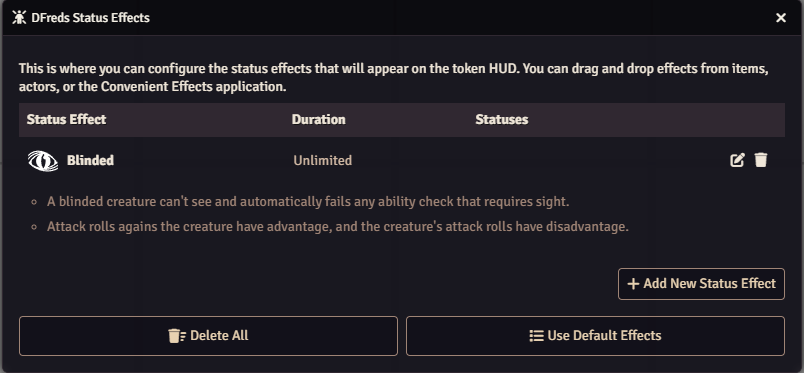
- Provides a simple to use config sheet to create, edit, duplicate, delete, and drag to reorder status effects
- Drag and drop effects onto the config sheet from items, actors, or the Convenient Effects app
- Import and export status effects as JSON from the config sheet
- Optionally show effect descriptions in the config sheet
- Optionally allows hiding the default status effects HUD button
- Adds a button to the Settings sidebar that opens the config sheet
- Effects added from Convenient Effects are toggled through Convenient Effects
- Provides an API for use in macros and other modules
Settings
| Setting | Scope | Default | Description |
|---|---|---|---|
| Hide Default Status Effects | World | Disabled | Hide the default token HUD status effects button. |
Alongside it is one config menu:
| Menu | Description |
|---|---|
| Status Effects | Configure the status effects that are available. |
Status Effects also appears as a button in the Settings sidebar, under the Module Settings heading. It opens the same window, and only Game Masters can see it.
Configure your status effects:
Required Modules
- Lib: DFreds UI Extender by DFreds - A library that makes it easy to add new UI elements to Foundry. It provides the token HUD button and the Settings sidebar button.
- Lib: DFreds Migrations by DFreds - A library that makes it easy to handle data migrations
Recommended Modules
- libWrapper by ruipin - A library that wraps core Foundry methods to make it easier for module developers to add functionality. Note that if you for some reason don't want to install this, a shim will be used instead.
Helpful Modules
While not strictly required, the functionalities provided by these modules drastically improve the usage of this module.
- DFreds Convenient Effects by DFreds - A module that provides an easy way to create active effects that can do lots of cool things.